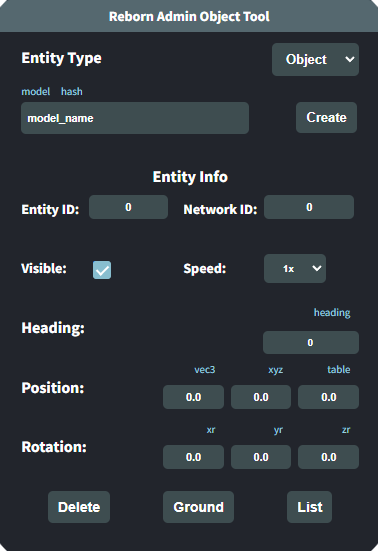
The Admin Object Tool (AOT) is a tool to help server admins create and manipulate new and existing objects, vehicles and PEDs. It has an easy-to-use interface and can be used to adjust anything you need on the fly! It can also spawn in a table of objects that have been created with the tool to be used for instant events and more. The AOT has a multitude of features including:
- Create any object/vehicle/PED on the fly
- Adjust positions of new and existing entities
- Copy coordinates in customizable formats to easily put into other scripts
- Copy heading and rotation data
- Copy entity and network IDs
- Delete items on the fly (perhaps due to a hacker or stuck entities)
- Supports Standalone, QBCore, and vRP frameworks
- Import/Export created object/vehicle/PED lists
The AOT also has multiple customizable options as well:
- Command name change
- Framework selection
- Minimum permission adjustment (QBCore)
- Configurable distance selection range
- Adjustable tool opacity
- Customizable decimal places for copyable data
- 3 customizable formats for copying coordinates
- Ability to add custom model name/hashes
With its current Import/Export feature, an admin can use this tool to help with creating an entire event of objects and vehicles with the click of a mouse. You can export a list of created items and copy/paste this list into any other scripts as needed or directly back into the AOT to spawn the list instantly.
This script is escrowed and only allows adjustments of the configuration file.
How To Use:
1) Open config.lua and adjust to your liking
2) Run /aot command (or the command you customized it to be)
3) Right-click on objects/vehicles/PEDs to manipulate
Questions:
Q: Where does the export go?
A: To the root of your FiveM server directory (where your server.cfg is usually)
Q: Where is the example file from the video?
A: It comes with the script, see: lsia_demoderby_example.txt
Q: Can I change the formats of the coordinate copying?
A: Yes! Just adjust Config.Formats and replace $x, $y and $z where you want the numbers to show up
Q: Do items stay after server restarts?
A: Not at this time, but it is a feature we are looking to add in the future
Video: https://www.youtube.com/watch?v=LVcLU2ajf78
Dependencies: None
Current Release: 1.1
Updates:
- v1.0 - Initial release
- v1.1 (4/14/2023) - Added ability to freeze/unfreeze objects including with imports and exports